


Live & 4k Wallpaper Home
4.13.00 Reviews
App Specs
- Version
- 0.1.3
- Updated On
- License
- Free
- Downloads
- 100,000+
- Developer
- Interior
- Categories
- Personalization
- Platform
- Android
Screenshots
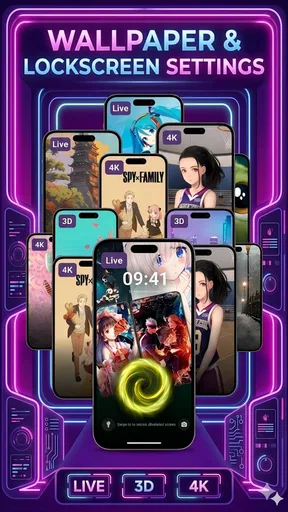
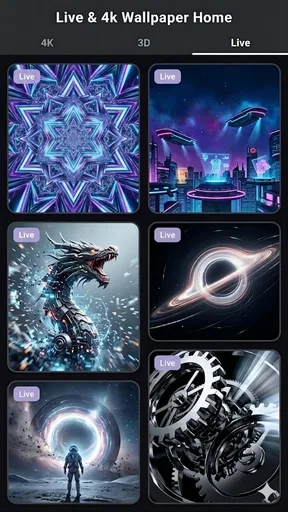

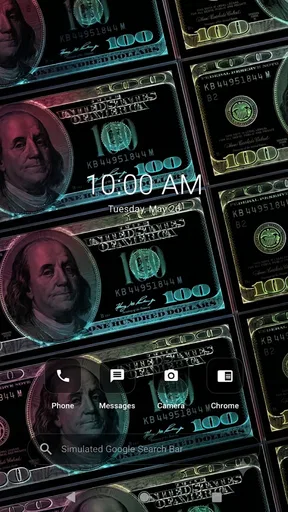
 Analysis by AppCompare
I spent time with Live & 4k Wallpaper Home as a personalization app, and my first impression was that it is trying to solve two everyday phone habits in one place: choosing a moving wallpaper and reaching commonly used parts of the device from a home-style interface. That combination gives it a more practical purpose than a wallpaper gallery alone, although it also means the experience depends on whether you actually want your home screen to do more than display an image.
The app comes from Interior and is free to use. Its focus is clearly visual, with live and high-resolution wallpaper content at the center, while the launcher element gives the home screen a more active role. I found the idea appealing for anyone who gets bored with a static background but does not want to rebuild the entire phone around a complicated customization system.
It is also worth setting expectations early. This is a relatively young product, currently at version 0.1.3, so I approached it as an evolving tool rather than a completely mature replacement for every launcher or wallpaper utility. That matters when deciding whether its simple, focused approach is a benefit or a limitation.
How the wallpaper-and-home experience feels in daily use
The most useful way to think about this app is as a visual refresh for the first screen you see every time you unlock your phone. A live background can make the device feel less repetitive, while the home component is intended to keep that refreshed screen useful instead of turning it into a purely decorative display.
In my experience, the best results come from treating the wallpaper as part of the phone’s layout, not as an isolated picture. A bright animated scene may look impressive in a preview but compete with icons, widgets, and text once it becomes the background. I would choose a calmer design for a work phone and reserve more energetic visuals for a personal device where the home screen can be expressive.
The high-resolution emphasis is another reason to try it on a modern display. Detailed artwork can look noticeably cleaner than an image stretched from a low-quality source. Still, sharpness alone does not guarantee a good result. The crop, contrast, and movement matter just as much. A detailed image with a busy center can make app labels harder to read, while a darker or less crowded composition usually gives the launcher a more comfortable balance.
The launcher side is potentially more valuable than it first appears. A wallpaper app normally affects appearance and then gets forgotten. By adding a home-oriented layer, Interior is aiming to make the visual choice part of a repeated workflow. That can be useful if you like changing the mood of your phone while keeping access to familiar actions in one consistent place.
Worth Reading Before You Choose

EA SPORTS FC Mobile 26 Is a Bigger Football Game, but It Takes Time

Flipboard Shows What News Apps Must Do Beyond the Feed

Switching to Android Auto Means Rethinking Your Driving Routine

Google Calendar Makes a Crowded Week Easier to Manage

Ludo King Makes the Most of the Minutes Between Plans

Baby Panda World Brings Quick Play to Modern Phones, but Its Game Library Feels Busy
Who will get the most from it
I would recommend it first to people who enjoy visual customization but do not want to spend an evening configuring a full third-party launcher. It also suits users who prefer a single, obvious place to manage the look of the home screen rather than switching between a wallpaper catalog, a launcher, and separate customization tools.
It makes particular sense for a secondary phone, a personal device, or a display-focused setup. For example, I can imagine using it on a phone kept in a kitchen or living room, where a pleasant animated background makes the device feel more like part of the room and the home interface keeps frequently used shortcuts easy to reach.
On the other hand, people who already have a carefully tuned launcher may find the added home layer unnecessary. If your current setup already handles icon packs, gestures, folders, widgets, and wallpaper rules exactly as you like, changing the launcher can introduce more friction than benefit. In that situation, a dedicated wallpaper application may be the cleaner choice.
A realistic morning scenario
Imagine starting the day by checking the weather, opening a calendar, and sending a quick message before leaving home. With a live background, the first screen can feel more personal, but the practical test is whether the animation distracts you or slows down those small actions. I would use a low-distraction scene, keep important icons away from the busiest area, and place the most-used shortcuts where my thumb naturally lands.
That approach reveals an important trade-off: the app’s strongest visual feature should not be allowed to undermine the home screen’s basic job. If you need to find an app quickly, readable labels and predictable placement matter more than a dramatic effect. The launcher concept works best when it supports that routine instead of demanding attention every time the phone is unlocked.
What the current release tells me about its direction
The current version is 0.1.3, and the release date is June 3, 2026. Those details place the app at an early stage, which helps explain why I would judge it more by the clarity of its core idea than by the depth expected from long-established personalization suites.
The core idea is easy to understand: combine 4K-style visual presentation, live wallpaper, and a smart home launcher in one experience. That is a sensible starting point because it avoids scattering the customization process across unrelated tools. The product does not need to be everything at once if it can make this particular combination feel smooth and dependable.
For existing users, a small version number also changes how I would use it. I would keep my preferred static wallpaper available and avoid making the app the only route to my everyday setup until I had tested it for a while. That is not a criticism of Interior; it is simply a practical habit with any early personalization tool that affects the first screen of the phone.
The app has already attracted more than one hundred thousand installs and holds an average rating of 4.1 from around one hundred forty ratings. I read that as a sign of real curiosity and generally positive reception, but not as proof that it will suit every device or every taste. A wallpaper experience is unusually personal: screen size, icon layout, battery habits, and tolerance for motion can change the result completely.
Its Everyone age rating makes it approachable for a broad audience. Parents, casual users, and people who are not interested in technical customization can try the visual side without needing a specialized interest in launchers. The free price also lowers the barrier to experimentation, especially for someone who wants to see whether a moving home screen feels pleasant before committing to a more elaborate setup.
Small choices that improve the result
My first practical tip is to judge a wallpaper after placing your real icons over it, not only in a preview. A scene that looks excellent by itself may hide labels or create visual noise behind a clock widget. I would test it with the exact arrangement I use every day, then switch to another option if the background forces me to squint or hunt for familiar icons.
Second, I would separate “looks impressive” from “works for long sessions.” Animated content can be enjoyable during a quick glance but tiring if it is constantly moving behind reading or messaging tasks. A restrained motion pattern is often a better daily choice than the most noticeable animation. This is one of the app’s less obvious trade-offs: the feature that attracts attention can become the feature you eventually want to tone down.
Third, I would create a simple fallback routine. Keep one static image that matches your icon arrangement, and remember where your essential apps are placed before experimenting with the launcher. That way, trying a new home presentation remains reversible rather than turning into a frustrating search for basic tools.
A fourth useful habit is to match the visual style to the phone’s role. On a gaming-focused device, a vivid animated scene may feel appropriate. On a work phone, a quieter background with clear areas for icons is likely to age better. The app’s value is not limited to finding the most spectacular image; it is in helping you choose a presentation that fits how you actually use the device.
Where it may still feel limited
The biggest potential weakness is the tension between a focused experience and the breadth of established launcher alternatives. A mature launcher may offer deeper control over grids, gestures, folders, icon behavior, widgets, and backup workflows. If those controls are central to your setup, a wallpaper-led app with a smart home component may feel too narrow.
There is also a practical question around visual consistency. A live wallpaper and a launcher do not automatically make a home screen coherent. The final result depends on how the background interacts with icons, notifications, widgets, and the phone’s own system behavior. Users who expect one tap to create a perfectly coordinated theme may need to do some adjustment themselves.
I would also be cautious about choosing motion for a device that is already visually busy. Notifications, widgets, and changing status information can compete with an animated background. In that case, the app may be better used for its high-resolution imagery in a calmer presentation rather than for constant movement.
Another limitation is simply that early software can feel less predictable than a long-established alternative. I would not build a highly elaborate home-screen workflow around it immediately. Try the app with a modest layout first, confirm that the launcher fits your habits, and only then invest time in detailed customization.
How it compares with the usual alternatives
Compared with a standard wallpaper picker, this app offers a more complete visual concept because it connects the background with the home experience. The ordinary picker is simpler and usually better for someone who wants to choose one image and move on. Live & 4k Wallpaper Home is more interesting when the home screen itself is part of the customization goal.
Compared with a dedicated live-wallpaper catalog, its launcher angle is the main distinction. A specialist wallpaper tool may be preferable if you want the widest possible control over animation, image sources, or presentation settings. This app is more appealing when convenience matters and you would rather explore wallpaper and home-screen behavior together.
Compared with a full custom launcher, Interior’s approach should appeal to people who want less configuration. A powerful launcher can be rewarding for enthusiasts, but it can also turn a simple visual change into a project. I would choose this app for a quicker refresh and a more guided experience, while choosing a mature launcher when precise layout control is the priority.
What I would watch as the product develops
Because the app is at version 0.1.3, I would pay attention to how Interior improves the balance between visual quality and everyday usability. The most meaningful progress would not necessarily be more dramatic wallpapers. I would rather see refinements that make it easier to keep icons readable, preserve a familiar workflow, and move between a live presentation and a calmer one without unnecessary effort.
I would also watch whether the smart home concept becomes more useful over time. The phrase suggests a launcher designed to do more than sit behind icons, but its long-term value will depend on how naturally it supports repeated actions. The best evolution would make the home screen feel more organized without forcing users to learn a new system for basic tasks.
For someone installing it now, my advice is to start with one home screen and a small number of shortcuts. Test the app during the routines that matter most: unlocking the phone quickly, reading notifications, opening a frequently used app, and returning home. If the live background remains pleasant and the launcher does not interrupt those actions, it has earned a place in your setup.
My overall view is positive but measured. The strongest reason to try it is the combination of visual freshness and home-screen purpose, not the promise of endless customization. It is free, accessible to a broad audience, and already has enough interest to show that the concept connects with users. At the same time, people who demand deep launcher controls or who dislike animated backgrounds may be happier with a simpler wallpaper picker or a more established customization suite.
I would recommend Live & 4k Wallpaper Home to a friend who wants a noticeable change without turning phone personalization into a technical hobby. I would suggest starting conservatively, choosing a readable background, and keeping a familiar fallback layout. Used that way, the app feels like a convenient visual upgrade with room to grow, rather than a replacement that every Android user needs.
Pros
- Offers a wide range of live and 4K wallpaper styles.
- High-resolution images look sharp on modern phone displays.
- Wallpaper categories make browsing and discovery easier.
- Can give your home screen a more personalized appearance.
- Regular content updates may provide fresh background options.
Cons
- Animated wallpapers may increase battery consumption.
- 4K files can use significant storage and mobile data.
- Some devices may experience reduced performance with live backgrounds.
- The free version may include ads or locked premium content.
- Compatibility and visual quality can vary between phone models.
FAQs for Live & 4k Wallpaper Home
What is Live & 4K Wallpaper Home?
Live & 4K Wallpaper Home is a wallpaper customization app designed to refresh your phone’s lock screen and home screen with animated backgrounds, high-resolution images, and themed collections. After exploring the app, users can browse different categories, preview wallpapers, and apply selected designs to their device. The available options may vary depending on the phone model, operating system, and the app version installed.
Does Live & 4K Wallpaper Home support live and 4K wallpapers on every device?
The app is intended to provide both animated wallpapers and high-resolution 4K-style backgrounds, but the experience is not identical on every smartphone. Live wallpaper support depends on the device manufacturer, Android or iOS version, screen resolution, and system restrictions. Some phones may display animated wallpapers only on the lock screen or home screen, while older devices may experience limited compatibility or reduced visual quality.
Is Live & 4K Wallpaper Home free to download and use?
Live & 4K Wallpaper Home may be available as a free download, but some wallpapers, collections, or customization features can require in-app purchases or a subscription. Before confirming any payment, users should carefully review the pricing, billing frequency, trial conditions, and cancellation policy shown in the store or inside the app. Free content may also include advertising or other usage limitations.
Will using live wallpapers affect battery life or phone performance?
Animated wallpapers generally consume more battery and system resources than static images because they may use continuous motion, effects, and background processing. During testing, the impact will depend on the wallpaper’s complexity, screen brightness, refresh rate, and the device’s hardware. If battery life becomes a concern, users can switch to a static 4K wallpaper, reduce animation effects, or disable live wallpaper features when the phone is not charging.
Is Live & 4K Wallpaper Home safe to install and what permissions might it request?
Users should install Live & 4K Wallpaper Home only from an official Google Play or Apple App Store listing and check the developer name, ratings, recent reviews, and privacy information before downloading. Depending on its features, the app may request permissions related to notifications, storage, media access, or wallpaper settings. Review each permission carefully and avoid granting access that does not appear necessary for choosing or applying wallpapers.


